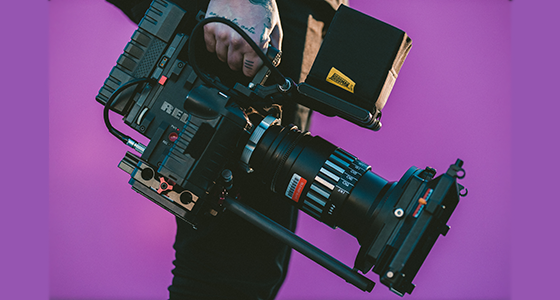
(Image via Unsplash)
Note From Tongal: "10 Questions to Ask Before You Use 4K" is part of a series of Tongal Community-written blog posts that were originally sourced in the In Your Own Words Tongal Blog Project. Read more Tongal Community-written posts here and stay tuned for more opportunities to Pitch a topic and write for the Tongal Blog!
---
Whether you’re shopping for a new TV, video game console, a Blu-Ray, or a DSLR, it’s hard to escape the proud advertisements of “4K.” Even your smartphone can shoot in 4K, now!
But what does “4K” actually mean? 4K is shorthand for a screen resolution of 3840 x 2160 pixels. The current industry standard is 1080p, or 1920 x 1080 pixels. A 4K picture is basically double the size of a 1080p image, which makes it more crisp, detailed, and future proof.

(Image via Adobe Stock)
Although 4K is very useful and increasingly popular, it is still a tool. Not every tool is right for every job. And because 4K footage can be expensive to obtain and difficult for editors to work with, consider the following before you choose 4K on your next project.
1. Will your final output be in 4K?
This is the most important question to start with. Many of the tips below – such as the ability to crop – assume that you will still render your final project in 1080p (HD).
But if your goal is to screen your film in full 4K glory on a huge screen, you will want to render in 4K…and, therefore, lose the ability to crop.
Remember that with resolution, all things are relative. You can always scale
2. Where will it be screened?
With double the image size and detail, 4K is easier to blow up on a big screen. If you are planning on showing your video on a large conference screen, a movie theater, or with a 4K television, you may wish to shoot in 4K.
However, if you’re just shooting for
3. Will you need to crop the footage?
For an editor, the most useful aspect of 4K is its leniency in post-production. With double the normal image size, 4K video can be cropped, zoomed, or even given fake pans. This is ideal for documentary and event shooters, who can shoot on the run and figure out the perfect framing later.
4. Is your camera a drone?
Similarly, 4K is essential on a drone, because many of them do not have zoom functions. All framing must be perfected in
5. What sort of computer setup are you using?
As any editor will tell you, 4K is a huge drain on a computer’s processing power. Be prepared for the extensive hardware required to handle 4K footage. You should use a computer with at least 32 GB RAM and a high-quality graphics card. It also doesn’t hurt to have a 4K computer monitor to view the footage in precise detail, especially before you render anything in 4K.
6. Will you need to upload the raw footage to the internet?
When shooting in 4K mode, you will quickly fill up your memory card. Handling hundreds of GB of files isn’t too bad, but it can be a strain on your internet connection if your client requests the raw footage. Not only do you have to pay extra for a file sharing service, but you will absolutely require a Gigabit internet connection to get your 4K clips on the web. If you are on a time crunch and don’t have 20 hours to upload to the cloud, save some time by choosing 1080p.
7. Will this footage require substantial color correction or visual effects?
Similar to its crop leniency, 4K video is lenient through other post-processing. If you require substantial visual effects, chroma keying, color correction, or stabilization, 4K will be a sharper image to work with.
8. Are your subjects people?
Shooting in 4K is like putting a magnifying glass over a person’s face. Most people are not thrilled with this level of scrutiny over their pores, so be sensitive when choosing your resolution. A softer HD image will flatter your subject more than the hyper-sharp 4K.
9. Do you need the video to be "future proof" or is this project very "present"?
In the last few years, have you come across an old TV show like Star Trek: The Next Generation on Netflix or BBC America? There’s something off-putting about old TV shows now: the aspect ratio.
Now, the standard output is 16:9 widescreen, but in the 1990s and earlier, everything was output in 4:3. For those who aren’t familiar with aspect ratio, this basically means that old TV shows are square, but we now view everything on rectangles.
This isn’t entirely related to resolution, but it’s definitely related to the concept of future proofing. The more a video professional keeps up with top-of-the-market technology like 4K, the longer their work will look relevant and timeless.
However, in the fast-paced world of internet marketing and social media, future proofing is not always a concern. A bride and groom may want their wedding video to hold up in 30 years. But if you’re running a seasonal video campaign to promote a product, no one will be watching in 5 years, let alone 30. The more disposable or seasonal your video, the less you need to think about future proofing.
10. Will you need to shoot any slow motion?
Now we need to talk about fps or, frames-per-second. Put simply, the more frames-per-second you can capture, the more you can convert to beautiful slow motion in the editing suite. You need to shoot at a minimum of 60fps to achieve great slow motion. Although it’s not impossible to achieve slow motion with 24fps or 30fps, you will have to go through some extra steps in a program like Adobe After Effects, and it will never look quite as good.
The problem is,
Although the iPhone 7 can capture 4K, it is limited to 30fps. The 4K mode on the DJI Phantom 4 drone is also capped at 30fps, even though you can shoot in HD all the way up to 120fps. So, if you insist on having both slow-motion at 60fps and 4K, you will need to obtain a camera that does both, such as the GoPro HERO6 Black.
Conclusions
4K is an awesome tool and will inevitably become the industry standard in a few years. But don’t stress if you don’t want to pay extra, or if you don’t have the processing power to deal with it. In many applications, your audience won’t notice the difference between 4K and HD. Additionally, 4K requires the sacrifice of other benefits, such as slow motion and skin smoothing.
But if your project can benefit from 4K’s sharpness, crop leniency, scalability, and
Just don’t even start thinking about 8K.